


Every business leader seeks ways to improve efficiency, strengthen collaboration, and achieve higher productivity. One of the most effective approaches to reach these goals is through third-party software integration. Connecting external applications and platforms with your existing systems helps your organization work more smoothly, exchange data more accurately, and deliver services faster.
This article explains how to integrate third-party systems into your company’s operations, the benefits of doing so, and how to make the process efficient and reliable. By understanding how integration works, your business can leverage digital tools more effectively to drive growth and innovation.
What is Third-Party Integration?
Third-party software integration refers to linking external applications, platforms, or tools with your existing business systems to create a seamless workflow. Rather than developing every feature internally, companies can use ready-made solutions that are already optimized for specific functions.
For example, a business can integrate a payment gateway like PayPal into its e-commerce platform or connect a CRM tool such as Salesforce with its customer database. These integrations simplify operations and reduce manual effort by automating data flow between applications.
Such integrations are often powered by third-party APIs (Application Programming Interfaces), which make it possible for separate software systems to exchange data and work together. The flexibility of APIs means businesses can connect virtually any system, from HR software to marketing tools, in a scalable and secure way.
By adopting third-party integrations, your company can improve efficiency, reduce costs, and accelerate time-to-market for new features. Instead of spending months developing custom tools, you can enhance your existing systems with proven external solutions that expand functionality and performance.
In the sections below, we will explore how third-party integration works in practical terms, how APIs enable this process, and what your business should consider before implementing it.
Connecting Systems and Devices Through Third-Party Integration
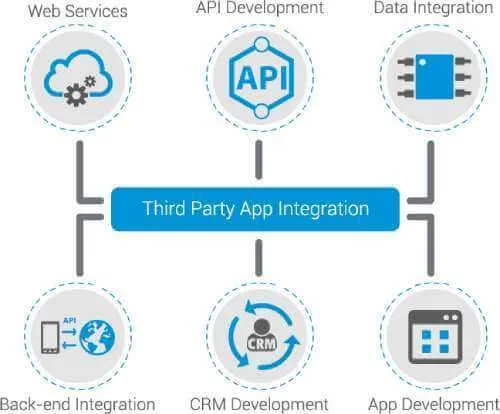
Integrating third-party software with your company’s systems or devices can be achieved through multiple methods, depending on the tools involved. The most common approaches include API connections, cloud connectors, or app store integrations that allow data to move between systems automatically.
In simple terms, this process enables your business applications to “talk” to each other. Whether it’s syncing employee data between an HR platform and payroll software or linking a customer support app to your CRM, integrations ensure your systems work as one.
Device integration goes a step further by allowing information to move across various hardware devices-computers, tablets, and smartphones-ensuring consistency and accessibility wherever your team works.
Using third-party components instead of building new software from scratch helps your business get up and running quickly. It eliminates the need for complex coding, reduces project costs, and shortens deployment time. Moreover, it provides flexibility-no matter what devices or operating systems you use, integrated systems ensure that your tools remain connected and up to date.
Ultimately, integrating third-party software allows your organization to streamline operations, increase productivity, and maintain agility in a fast-changing digital environment.
What is API?
An API (Application Programming Interface) is the key technology behind third-party software integration. It serves as a bridge that allows two independent software systems to exchange information securely and efficiently.
Think of an API as a translator between applications. It defines how requests and responses should be made, ensuring both sides understand each other. For example, when your company’s booking app displays real-time availability or pricing from an external database, it’s using an API to retrieve and deliver that data.
APIs follow specific protocols that outline how systems should communicate. These protocols keep data exchanges consistent, reliable, and protected. In business operations, this means smoother workflows and fewer manual steps.
APIs are the foundation of many modern business solutions – from payment processing and logistics tracking to customer service automation. They make it possible for companies to integrate multiple platforms into a unified system that enhances efficiency and provides a better customer experience.
The API documentation serves as a guide for technical teams. It describes the functions, parameters, and structures necessary to connect two systems properly. Even though the technical side is often handled by IT specialists or integration partners, understanding the purpose of APIs helps business leaders make informed decisions about which tools to connect and why.
Managing Project Costs in Third-Party Software Integration
While third-party software integration offers significant advantages, it’s important to consider its impact on cost and project complexity. Integrations vary in price depending on the number of systems involved, the complexity of data exchange, and the degree of customization required.
The more features you integrate, the higher the effort needed to ensure compatibility and performance. This can affect development timelines and budgets. However, when compared with building new software entirely in-house, third-party integration remains a cost-effective approach.
Choosing the right developer or technology partner is crucial. Your integration partner must understand how each external API works and anticipate potential challenges-such as version updates or changes from the third-party provider-that could affect stability.
Unexpected changes to an API can disrupt your operations if not managed properly. Therefore, thorough research, testing, and long-term maintenance planning are essential.
Despite the upfront investment, the benefits usually outweigh the costs. Integration helps your business save time, automate processes, and improve operational accuracy-all of which translate into long-term financial gains.
How to Integrate a Third Party’s API
Software integration does not have to be complicated if your business follows a structured process. Proper testing and preparation can help you avoid common challenges during third-party software integration and ensure reliable results.
1. Building the Product and Gaining Knowledge Before Testing
Before testing, your team should develop a clear understanding of how third-party applications interact with your existing systems. Test integrations in a realistic business context rather than in isolation.
Sometimes, issues from external apps can appear as product bugs, slowing down time-to-market. To prevent this, ensure your QA (Quality Assurance) team has full visibility of both internal and third-party systems. Maintain a comprehensive knowledge base or internal library of resources about each integration.
Regular training sessions will also keep your staff updated on evolving technologies, allowing them to manage integrations effectively.
2. Verifying Proper Communication Between the Product and the App
Once integrations are set up, the next step is to verify communication between systems. Check that your internal software can send and receive data from the third-party app correctly.
Many issues occur when systems lack sufficient permissions or when APIs restrict access to certain functions. Early verification helps identify and fix these issues before launch, ensuring your data exchange is stable and consistent.
3. Checking Functionalities – Integration and Upgrading
After integration, always test functionalities before and after any software update. This ensures your workflow remains intact and features continue to perform as expected. Upgrading either your internal system or an external application can cause incompatibilities. Conducting performance, security, and regression tests after each update minimizes these risks. By treating integration as an ongoing process, not a one-time project, your business can maintain reliable connections and deliver continuous value.
Why Third-Party Integration is So Important
Even if your company develops software internally, external integrations can unlock far greater potential. Third-party software integration helps your business enhance existing systems without starting from zero.
Instead of building every new function from scratch, you can use pre-built solutions that are proven, secure, and efficient. This allows you to expand capabilities, improve user satisfaction, and accelerate innovation-all while reducing internal workload.
For instance, your business might integrate external analytics tools for better insights, automation platforms for faster workflows, or payment systems to simplify transactions. These integrations not only save time and cost but also strengthen your product’s overall competitiveness.
By leveraging third-party integrations, your applications can exchange data seamlessly, maintain faster performance, and provide more complete services to customers.
In short, integration allows your business to stay flexible, scalable, and ready to adapt to new opportunities.
What Are the Chief Benefits of Third-Party Integrations?
Let’s summarize the main advantages of third-party software integration for your business.
- Faster Production: Integrations reduce the amount of manual coding and configuration needed. Your business can deploy new features faster and redirect saved time toward marketing, training, or strategic planning.
- Cost Reduction: Third-party integrations cut down on development costs by leveraging existing solutions. The money saved can be reinvested into innovation or customer experience improvements.
- Combining Better Features: Integrating external software allows your business to combine multiple high-quality features into one system. This creates a stronger, more capable product that meets a wider range of customer needs.
- Better User Experience: Seamless integration enhances both internal and external user experiences. Employees can work efficiently with connected tools, while customers enjoy smoother, faster, and more reliable interactions.
Final Thoughts
Third-party software integration is not just a technical improvement’s a strategic investment in your business’s long-term success. By connecting your existing systems with trusted external applications, your company can operate more efficiently, respond faster to changes, and deliver greater value to customers. The goal is not only to make technology work together but to create a unified, intelligent environment that supports growth, innovation, and satisfaction for everyone involved. With the right integration strategy, your business can transform complexity into clarity and potential into performance.
Contact FixPartner to discover how our integration experts can help you design, implement, and optimize third-party software solutions that empower your business to achieve lasting success.

